If you’ve been going back and forth on whether to give your child a smartphone, you’re not alone. “Maybe it’s too soon” and “maybe I’m being overprotective” — most parents find themselves caught between both feelings at once, looking for an answer that doesn’t quite come.
This article focuses on what to think through before you get to device comparisons and carrier plans — specifically: putting into words why you’re giving your child a phone, building rules together as a family, and creating a family approach that keeps communication open after your child starts using the phone.
Before choosing a device, the most important first step is for parents and children to agree together on the purpose of the phone, daily time limits, which apps are allowed, and what to do when something goes wrong.
- When to give a child a smartphone depends not just on age, but on purpose and household rules.
- If the main goals are communication and location tracking, a kids’ phone may be enough to start.
- Filtering software alone isn’t sufficient — what matters most is building a relationship where your child feels comfortable coming to you when they’re worried.
Table of Contents
Before Giving Your Child Their First Smartphone, Decide This First
Before you pick a device, the first step is for your family to put into words why you want your child to have a phone — and what you will and won’t allow at this stage.
There’s nothing wrong with giving your child a phone because they’ve been asking for one, or because their friends have started getting them. But if you hand it over without being clear on the purpose, you lose your footing the moment something comes up — there’s no shared understanding to come back to.
How to choose a device or configure filtering settings are things you can look up later. But your family’s values around how the phone will be used — that’s something worth talking through before the phone ever changes hands, because building it in retrospect is much harder.
Keep the Purpose to Three Things
When thinking about why you’re giving your child a smartphone, try to narrow it down to three purposes at most, and put them into actual words.
“Staying in touch,” “for pick-up after activities,” “for looking things up and schoolwork” — every family’s reasons are different, but leaving this vague is how phones gradually become mainly about videos, games, and social media without anyone quite deciding that’s what should happen.
Limiting to three purposes isn’t about restriction. It’s about giving your child their own reference point — a way of asking themselves “does this fit why I have this phone?” That internal question, one they can eventually apply on their own, is the real long-term goal.
A 10-Point Checklist Before You Hand Over the Phone
Here are ten things worth confirming before the phone is given.
- Have you and your child talked through the purpose of having the phone?
- Have you set a daily time limit?
- Have you agreed on where the phone can be used (at home, outside, in the bedroom)?
- Have you decided on the rules around social media and LINE (Japan’s most widely used messaging app among families and school-age children) — allowed, not allowed, or allowed with conditions?
- Have you set rules around in-app purchases and paid apps?
- Have you set up filtering?
- Does your child know who to talk to if something goes wrong (a parent, teacher, or trusted adult)?
- Have you checked your child’s school’s policy on bringing phones to school?
- Have you agreed on what happens if a rule is broken — including the conversation process?
- Have you scheduled a review date one month from now?
You don’t need to tick every box before handing over the phone. What matters is that these questions were considered together — before the phone was given, not after something came up.
Editor’s Note: If You’re Still Unsure, That Means You’re Thinking It Through
A note from the TamagoDaruma editor
I spent more than a year going back and forth on whether to give my own child a smartphone. Part of me felt it was too early. At the same time, I worried about being overprotective — friends in the class already had phones, and I didn’t want my child to feel left out.
Looking back, that period of uncertainty was time I was genuinely thinking about my child. Families who gave their kids phones right away aren’t being careless, and families who kept deliberating aren’t being overly cautious. If you’ve been building up a sense of what your family values during that time, that’s already the foundation for your rules.
At What Age Do Most Children in Japan Get Their First Smartphone?
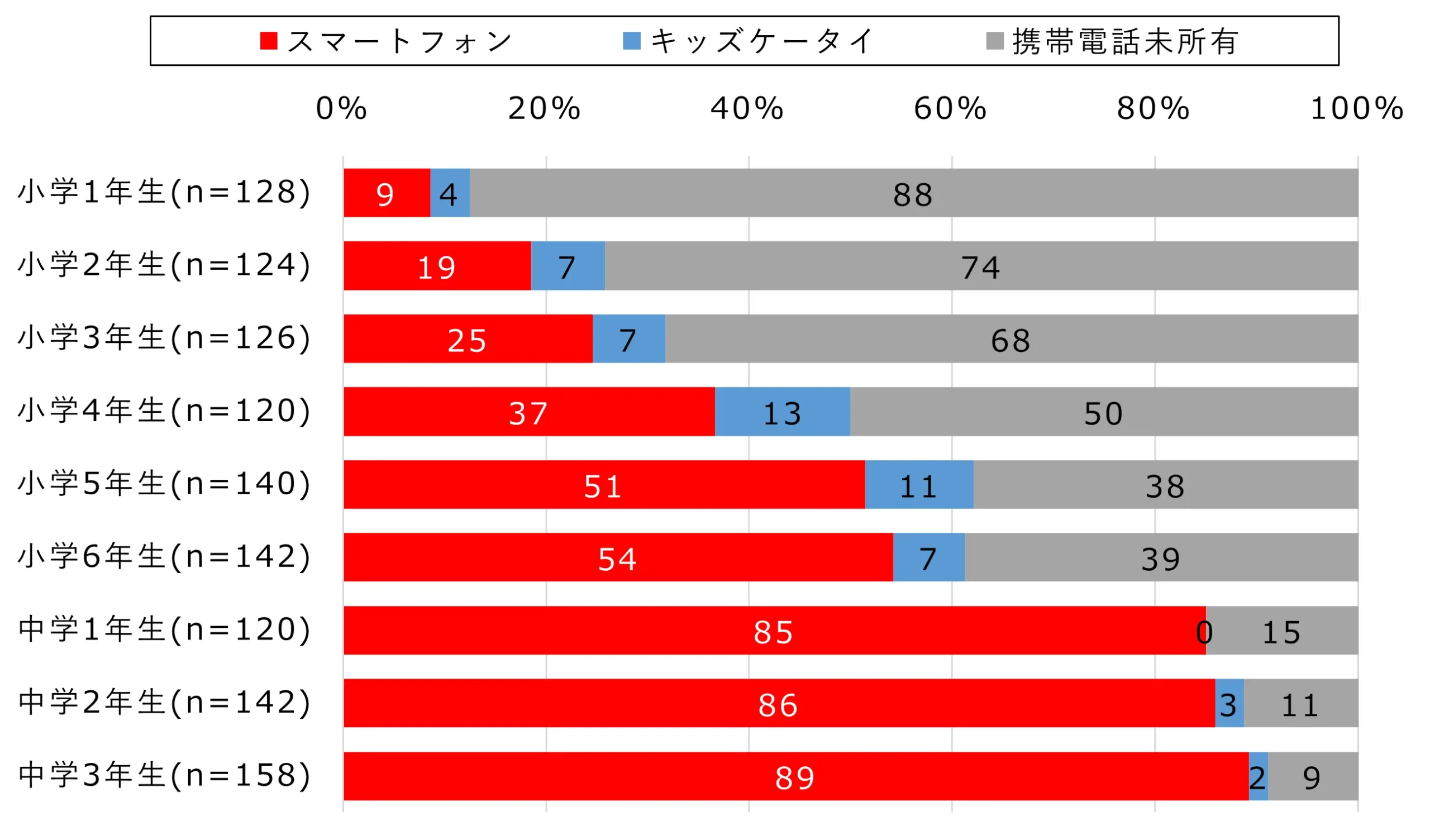
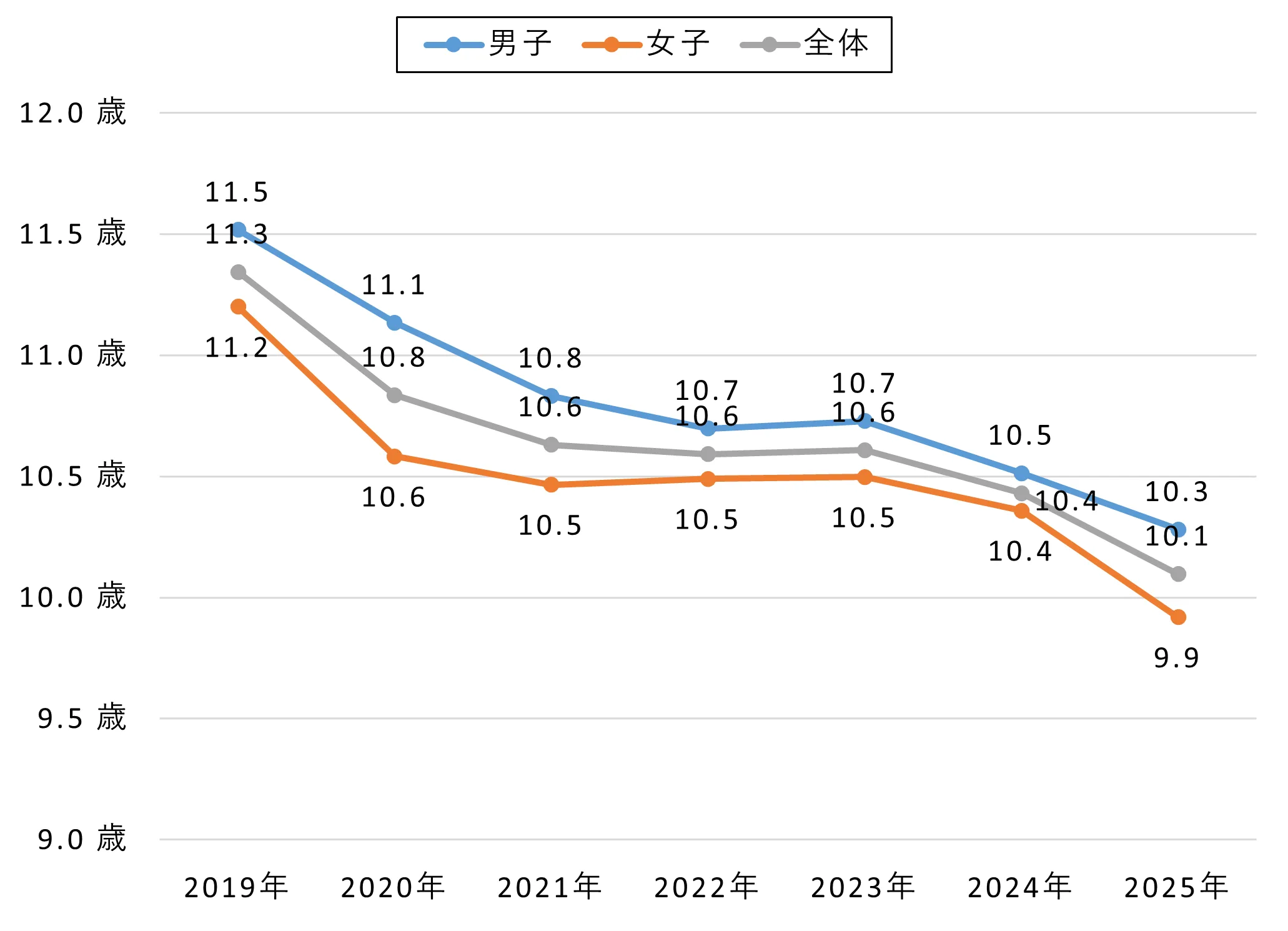


There is no single right age to give a child a smartphone. Statistics are useful as context, but the more relevant questions are: how far does your child travel on their own, do you have a real need to stay in contact, and can you have a conversation about rules together?
According to a nationwide survey conducted in November 2025 and published by NTT Docomo’s Mobile Society Research Institute in January 2026, smartphone ownership passes 50% among fifth-grade elementary school students, and exceeds 80% among first-year junior high school students. The average age at which children first got a smartphone was 10.4 years for boys and 9.9 years for girls (10.2 overall) — the first time since tracking began that the average for girls fell below 10.
It’s understandable to want to use statistics as a guide for timing. But averages are reference points, not instructions. If the family next door gave their child a phone in fifth grade, that doesn’t mean waiting until sixth grade is wrong. What matters is being able to explain your own reasoning as a family.
The Children and Families Agency’s “FY2025 Survey on the Internet Usage Environment for Young People” (published March 2026) covers smartphone and mobile phone ownership and usage among young people in Japan, family rules around devices, and filtering usage. It may be a useful reference for comparing your child’s situation to broader patterns.
(Reference: FY2025 Survey on the Internet Usage Environment for Young People | Children and Families Agency)
For Elementary School Years 1–3 (Ages 6–9)

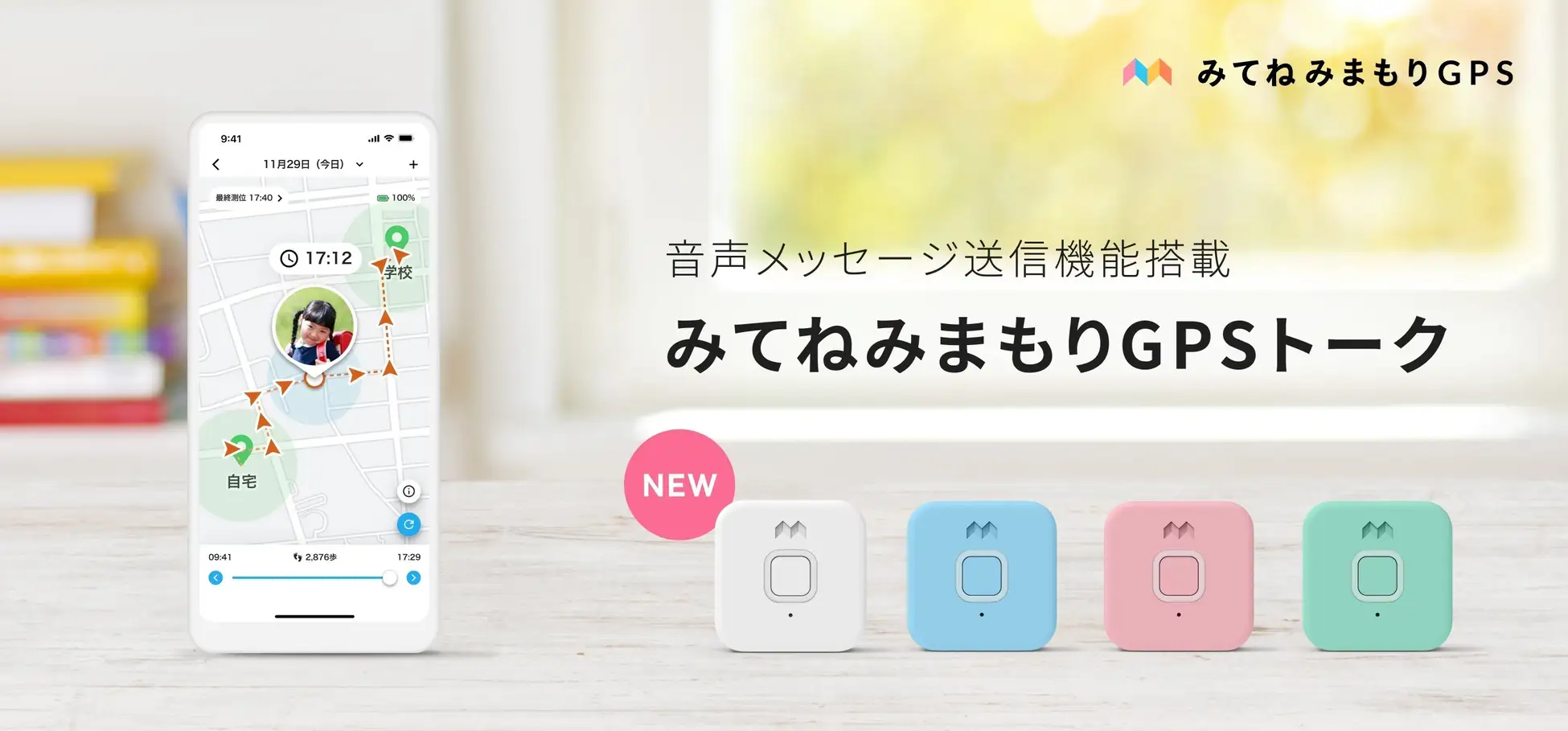
For children in the lower elementary school years, if the goal is limited to “contacting us on the way to and from school” or “for pick-up after activities,” it’s worth asking whether a smartphone is actually necessary at this stage.
For many families at this age, a kids’ phone — known in Japan as a “kids keitai,” a simplified mobile phone designed mainly for calls, GPS tracking, and emergency contact — or a dedicated GPS tracking device covers the need just as well. It’s also worth considering whether your child is ready to manage all the features a smartphone brings (search, apps, social media), and whether you have the time to stay on top of the settings. Giving a young child a smartphone isn’t inherently wrong, but matching the device to the purpose and your child’s readiness is worth thinking through first.
For Elementary School Years 4–6 (Ages 9–12)
By the upper elementary school years, the practical case for a phone becomes more tangible — getting to and from cram school or activities independently, staying in touch with friends, doing research for school, staying in touch after school or when they are home alone. NTT Docomo’s survey data shows a sharp rise in smartphone ownership from this age group onward.
At this stage, the central question shifts from “should we or shouldn’t we” to “how do we set this up well.”
How to Decide Without Letting “Everyone Has One” Be the Only Reason
“All my friends have one” carries real weight for both children and parents. But making the decision based only on what others are doing tends to leave the reasoning vague — and vague reasoning makes it harder to manage once the phone is actually in your child’s hands. Use what’s happening around you as context, but make the decision based on these three things:
- What is our specific reason for giving our child a phone?
- Is our child ready to manage this responsibly right now?
- Can we talk through expectations together as a family?
“Can we talk about rules together” is particularly important. When things do go wrong after the phone is given, the factor that most often determines the outcome isn’t which device was chosen or how old the child was — it’s whether the child felt able to bring the problem to a parent.
Check Your Child’s School Policy First
Before giving your child a phone, make sure you know your school’s rules on bringing mobile phones to school. MEXT (Japan’s Ministry of Education, Culture, Sports, Science and Technology) guidelines state that mobile phones are in principle not permitted in elementary and junior high schools in Japan, though exceptions may be considered in cases of genuine need — such as for commuting safety — if parents submit a formal request to the school principal. These guidelines mainly apply to public elementary and junior high schools in Japan; how they are applied in practice varies by school and municipality, so check with your school before making any decisions.
(Reference: Guidelines on the Handling of Mobile Phones in Schools | Ministry of Education, Culture, Sports, Science and Technology (MEXT))
Note: If your child attends an international school in Japan, the school sets its own device policy — check directly with their administration.
Kids’ Phone or Smartphone: Which Is Better to Start With?
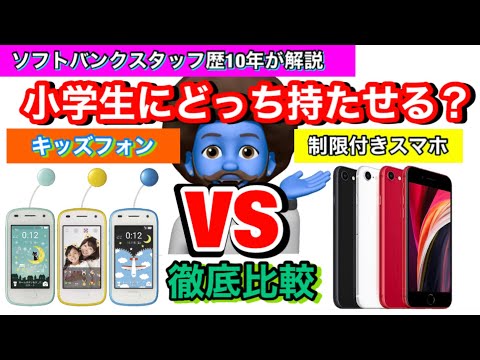
If the main goals are communication and location tracking, a kids’ phone is the more straightforward choice. If you need learning apps, web search, and broader functionality, a smartphone makes more sense — though that requires household rules and filtering to be set up alongside it.
The answer to “which is better” depends entirely on what you need it for. Smartphones have more features, but more features also means more exposure to risk. “Starting with the option that’s easier to manage” is a perfectly reasonable way to approach this.
When a Kids’ Phone Makes More Sense
In the following situations, a kids’ phone tends to be easier to manage and puts less pressure on both parent and child.
- The goals are specifically “communication for school commuting or activities” and “GPS location tracking”
- Your child is in the lower to middle elementary years and you’ve decided apps and social media aren’t needed yet
- You don’t have a lot of time to stay on top of settings and monitoring
- You feel a full smartphone might be a bit much for your child to manage right now
That said, kids’ phones have limits — as children grow, they tend to find the functionality too restrictive. Many families end up switching to a smartphone within a relatively short time, so it’s worth factoring long-term costs into the decision as well.
When a Smartphone Makes More Sense
In the following situations, a smartphone is the more practical choice over a kids’ phone.
- There are uses beyond communication — learning apps, research, sharing photos with family
- Your child is in the upper elementary years or older and is at a stage where you can talk through expectations together
- You want to gradually build your child’s digital literacy over time
If you go with a smartphone, setting up household rules and filtering needs to happen at the same time. Giving a child a smartphone is just the starting point — without a plan for how it will be used, the device itself won’t work well regardless of how good it is.
Comparison: Kids’ Phone vs. Smartphone
| Factor | Kids’ Phone (Keitai) | Smartphone |
|---|---|---|
| Main purpose | Communication and GPS tracking | Communication, learning, search, and apps |
| Best fit | Lower to middle elementary years | Upper elementary and older, when rules can be discussed |
| Social media use | Generally restricted by design | Possible, depending on settings and household rules |
| Main risks | May feel too limited as the child grows | Videos, social media, in-app purchases, excessive use |
| Ease of parental management | Relatively straightforward | Requires filtering setup and ongoing conversation |
| Need for household rules | Necessary | Even more necessary |
This comparison is intended as a general guide. Carrier pricing and features change, so check each carrier’s official website for the latest information before signing any contract.
If You Want to Keep Costs Down: Comparing Your Options
If cost is a priority, it helps to think across three categories: kids’ phones, kids’ smartphones, and budget SIM card plans used with a regular smartphone.
As of 2026 in Japan, communication-focused devices for children start at around ¥500 per month. If you also want app access, photos, learning tools, and family messaging, kids’ smartphones and budget SIM options are available in roughly the ¥1,000–¥2,000 per month range.
| Option | Approximate Monthly Cost | Best For | Things to Know |
|---|---|---|---|
| Kids’ Phone (Keitai) | Approx. ¥500–¥700/month | Families whose main goals are communication and GPS tracking | Not suited for apps, social media, or web browsing. Device fees and location service charges may apply separately. |
| Kids’ Smartphone | Approx. ¥1,000–¥2,000/month | Families who want to gradually introduce photos, apps, and learning alongside communication | Device fees may apply separately. More features means household rules and monitoring setup become more important. |
| Budget SIM / Online-Only Plan | From approx. ¥500–¥1,000/month | Families who want to use an existing or secondhand device and keep costs low | Child-specific monitoring features may be limited. Parental controls and app restrictions need to be configured by the parent. |
As a reference for current pricing in Japan: NTT Docomo’s “Kids Keitai Plan” is listed at ¥550/month (tax included), SoftBank’s “Basic Plan 2 (Kids Phone)” at ¥748/month (tax included), and au’s “U12 Value Plan” at ¥550/month (tax included) with applicable discounts. Device fees, option charges, call charges, and location service fees may all apply on top of these figures — check the latest terms on each carrier’s official website before signing up.
(Reference: Kids Keitai Plan | NTT Docomo / “Kids Phone 4” Launches on SoftBank February 20 | SoftBank / U12 Value Plan | au)
In the kids’ smartphone category, Hamic MIELS nico is one option: the device itself is ¥29,700 (tax included) with a basic monthly plan of ¥1,100 (tax included), or a share plan including rental and data at ¥2,200/month (tax included). It’s designed around a dedicated app and monitoring functions rather than standard phone calls and SMS, so it works differently from a conventional smartphone.
(Reference: Hamic MIELS nico | Hamic STORE)
If you already have a spare smartphone at home, budget SIM cards and online-only plans are another way to keep costs down — options like Rakuten Mobile’s “Saikyou Kodomo Wari” (children’s discount plan) or LINEMO’s 3GB plan at ¥990/month (tax included) are worth comparing. If you go this route, keep in mind that child-specific monitoring tools aren’t built in — you’ll need to configure parental controls and app restrictions yourself.
(Reference: Saikyou Kodomo Wari | Rakuten Mobile / LINEMO Plans | LINEMO)
Budget SIM plans can be attractive on cost alone, but for a child’s first phone, “cheap” isn’t the only thing that matters — ease of parental management and whether your child knows they can come to you when something goes wrong both count too.
A rough guide: kids’ phone if the goal is communication and location tracking; kids’ smartphone if you want to introduce apps and learning gradually alongside communication; budget SIM if you can handle the configuration yourself and want to keep costs low.
Household Smartphone Rules to Agree on Together Before Handing Over the Phone
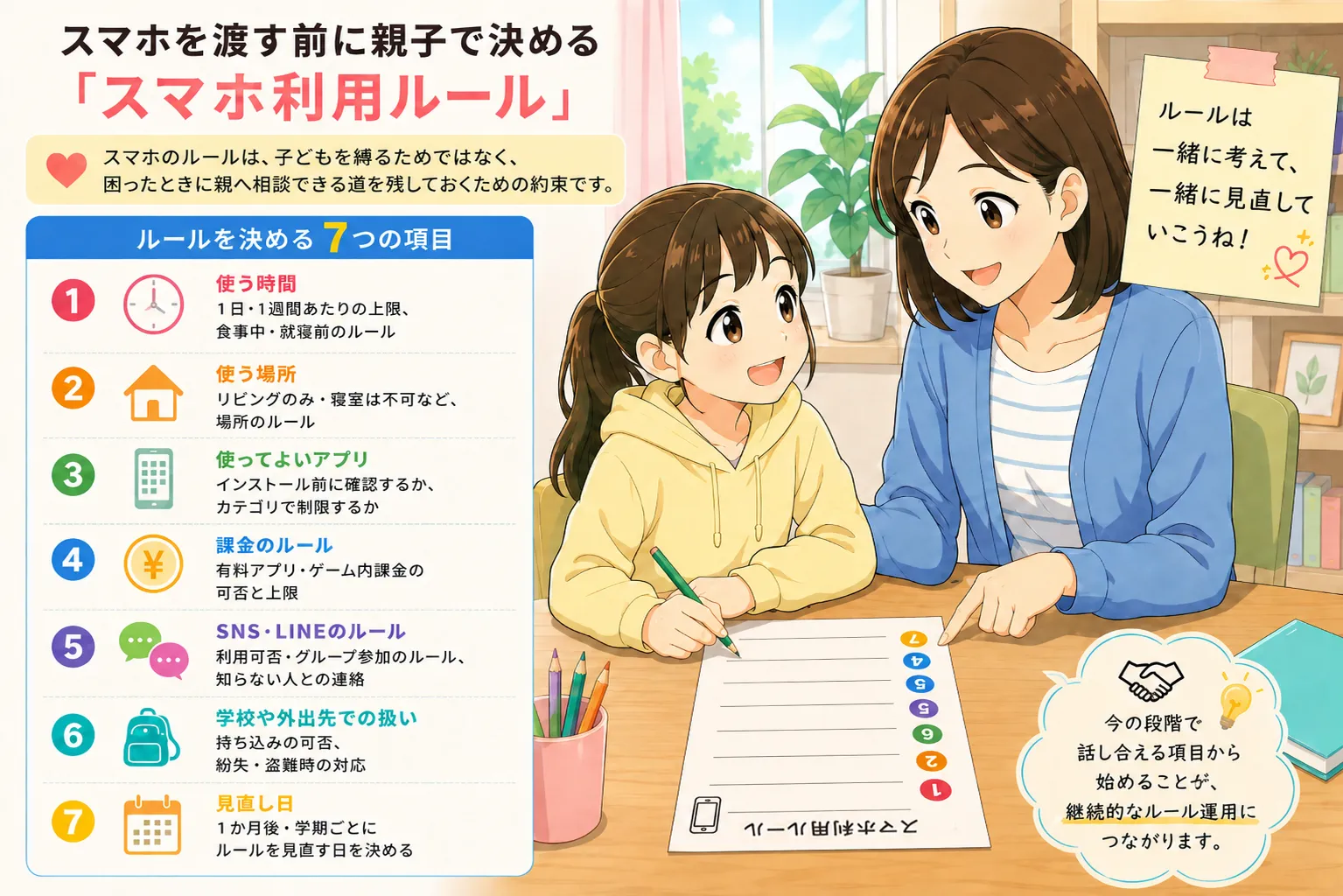

Smartphone rules aren’t about controlling your child — they’re about keeping a path open so your child can come to you when something goes wrong.
The most common reason household rules stop working isn’t the content of the rules — it’s three patterns that tend to appear: the child never really agreed to them, no one thought through whether they’re actually workable, and no one decided what happens when a rule is broken. Rules aren’t just for enforcement. They’re also the foundation for a conversation when things come up.
Seven Areas to Decide Together
Work through the following seven areas together with your child.
- Time limits: Daily and weekly caps, rules around mealtimes and before bed
- Where the phone can be used: Living room only, not in the bedroom, and so on
- Which apps are allowed: Whether to review before installing, or to restrict by category
- Rules around purchases: Whether paid apps and in-app purchases are allowed, and if so, up to what amount
- Social media and LINE rules: Whether they’re allowed, rules for group chats, no contact with strangers
- Handling at school and outside the home: Whether it can be brought to school, what to do if it’s lost or stolen
- Review date: Set a specific date — one month from now, or once per school term — to revisit the rules together
You don’t need to work through all seven perfectly before the phone is given. Starting with what you can actually discuss right now, and building from there, is what makes rules sustainable over time.
Three Patterns That Make Rules Stop Working
These come up in most families at some point.
1. Parents decided the rules alone, and the child never bought in.
Rules that feel handed down from above become things a child feels justified in breaking. Whether the child understands why the rule exists — and feels like they were part of making it — is often what determines whether it actually holds.
2. Rules that are too detailed to stick to.
Overly specific rules are hard for both parent and child to track. “Three big principles, everything else discussed as it comes up” tends to work better over the long run.
3. No one decided what happens when a rule is broken.
Without a process agreed on in advance, responses to rule-breaking tend to be reactive and emotional. Deciding ahead of time — “temporary pause, conversation, then conditions for resuming” — protects the parent-child relationship when something does happen.
When a Rule Is Broken, Don’t Go Straight to Confiscation
Taking the phone away can feel like a clean resolution in the moment, but it can leave a lasting mark. There are situations where a temporary suspension makes sense, but when it happens in the heat of the moment without a pre-agreed process, the effect is often that the child becomes less likely to come to you next time.
It’s worth deciding together in advance on graduated responses — “one week suspension,” “temporarily reducing screen time,” “back to supervised use with a parent” — so that when something does happen, you’re responding to a process you both agreed on, rather than reacting in the moment. Protecting the relationship where your child can talk to you is, in the long run, more protective than the consequence itself.
How to Put Together a Family Smartphone Agreement
Using the seven areas above and the 10-point checklist, putting together a written family smartphone agreement makes it easier to look back on what was decided.
An agreement might include:
- A section for writing down the purpose of the phone
- The seven rule areas, with space to fill in what was agreed
- Rules around purchases and apps
- Space to write down who to contact if something goes wrong
- The agreed process if a rule is broken
- A review date
- Signatures from both parent and child
The act of writing things down is itself a way of starting the conversation. It doesn’t need to be filled in perfectly — using it as a record of “this is what we talked about today” is exactly the right way to approach it.
What to Know About Filtering and Parental Controls


Filtering matters, but it won’t make everything safe on its own. Think of settings and parent-child conversation as two things that need to work together.
Under Japan’s Youth Internet Environment Act (formally, the Act for Developing an Environment that Enables Young People to Use the Internet Safely and Securely), mobile carriers in Japan are legally required to provide filtering services for children’s devices by default, unless the parent actively opts out. This is a Japan-specific legal requirement — the default filtering obligation on carriers does not exist in all countries, so it may be different from what you’re used to if you’ve moved to Japan from elsewhere.
(Reference: Creating a Safe and Secure Online Environment for Young People | Children and Families Agency)
Filtering is an effective tool for restricting access to harmful websites and inappropriate content. But it doesn’t cover everything — problems that arise within communication itself, such as group chats with people your child already knows, social dynamics in online games, or LINE group situations, are largely outside what filtering can address.
What Filtering and Parental Controls Can and Can’t Do
| Type | What It Mainly Covers |
|---|---|
| Carrier-provided filtering | Restricting access to harmful websites and inappropriate content |
| OS parental controls | App install restrictions, screen time limits, age rating management |
| App store and payment settings | Purchase restrictions, requiring parental approval for transactions |
| Household rules | No phones in bedrooms, conditions for social media use, who to talk to if something goes wrong |
App install restrictions and screen time limits fall under the OS parental controls (such as Screen Time on iOS or Digital Wellbeing on Android), not carrier filtering. Think of filtering not as a safety guarantee, but as one layer in a set of measures that reduces risk.
Also worth noting: if you’re managing restrictions only through your home Wi-Fi router, those restrictions won’t apply when your child is on a different network outside the home. Make sure parental controls and account settings are also configured at the device level.
A Settings Checklist to Go Through Before and After Handing Over the Phone
- Is parental approval required before any app can be installed?
- Are in-app purchases and paid apps restricted?
- Have you set a daily screen time limit?
- Is safe search filtering turned on?
- Have you reviewed location sharing settings?
- Have you set restrictions on phone use during nighttime hours?
- Have you decided which social media apps, if any, can be installed?
- Have you decided how the passcode is managed — does your child know it, and do you?
- Have you set up a way for you to periodically check in on usage?
- Have you scheduled a date to review these settings?
For details on filtering setup specific to each carrier, check the official websites of NTT Docomo, au, SoftBank, and Rakuten Mobile directly.
Review the Rules One Month In
In the first week or two after the phone is given, both parent and child tend to be conscious of the rules. But as weeks and months pass, the rules can quietly fade from view. When you first set up the rules, put a specific review date in the calendar — one month from now is a good starting point.
A review isn’t a moment to tell your child off. It’s a check-in: what went well, what was difficult, what you want to change. Building that into a regular habit is how rules grow and stay relevant.
How to Keep Communication Open After Your Child Gets a Smartphone
Managing your child’s smartphone use isn’t about surveillance — it’s about maintaining a relationship where your child feels they can come back to you when something goes wrong.
Even with filtering in place and rules agreed upon, the most important question is still: if something happened, would my child feel able to tell me? In many cases where problems escalate, it’s not the situation itself that caused the most damage — it’s that the child felt unable to say anything to a parent until it had already gotten worse. The strength of the safety net isn’t the monitoring settings — it’s the sense your child has that they can bring something to you.
Finding the Right Balance Between Oversight and Trust
After giving a child a phone, how much parents check in on usage is a judgment call every family makes differently. Some families take a “we see everything” approach; others default to trust with check-ins when something feels off. What matters is that both approaches are agreed on between parent and child in advance. Deciding upfront — “here’s what I’ll check, here’s what I’m trusting you with” — prevents the sense of betrayal that can come from an unexpected look through the phone, and makes it easier to hold safety and privacy together.
The right balance will also shift depending on your child’s age, maturity, and whether anything has come up before. “Starting with supervision, moving toward trust as they show they’re ready” is a realistic way to structure things.
How You Handle the First Rule Violation Matters
The first time a rule gets broken is a real fork in the road for the parent-child relationship. Responding with anger tends to push children toward “I won’t tell them next time.” Responding with a conversation about what happened — why it happened, what to do differently — builds the sense that “I can actually talk to my parent about this.”
Having an agreed-on process for when something goes wrong — “pause use, have a conversation, agree on the conditions for starting again” — means you’re not responding in the heat of the moment when it actually happens. And it’s worth remembering: a rule violation isn’t always a sign that your child is being deliberately defiant. Often, it’s a sign the rule didn’t quite fit reality, and it’s time to adjust.
Editor’s Note: Giving a Smartphone Is Just the Beginning
A note from the TamagoDaruma editor
Giving your child a phone isn’t the end of something — it’s the start of building a new set of shared family norms together. What I’ve heard consistently, both through reporting and from readers, is that the real hurt in smartphone-related problems rarely comes from the phone itself. It comes from the accumulation of moments where a child felt they couldn’t say something to a parent.
The rules you set before handing over the phone don’t need to be perfect. Families who start with “these are our provisional rules for now, and we’ll adjust them together in a month” tend to do better over time. A smartphone can actually become a reason to start more conversations with your child — not a reason for fewer.
Common Questions
There’s no universal right answer when it comes to a child’s first smartphone — it depends on the family. Here are some common questions, approached from the angle of decision-making and household rules.
Q1. What’s the right age to give a child their first smartphone in Japan?
There’s no single correct age. NTT Docomo’s Mobile Society Research Institute survey shows that ownership passes 50% among fifth-grade elementary school students, but the questions that matter more are: is there a real need to be in contact, can you talk through expectations together as a family, and is your child ready to manage themselves? The same age can mean very different situations depending on the family.
Q2. Should I choose a kids’ phone or a smartphone?
If the goals are communication and GPS tracking only, a kids’ phone is the more straightforward starting point. If you need learning apps, web search, and broader functionality, a smartphone makes more sense.
Smartphones require household rules and filtering to be set up alongside them. If you’re unsure, focus on what you actually need it for right now — not what you might need in the future.
Q3. Is filtering enough to keep my child safe?
It significantly reduces risk, but it isn’t a complete solution.
Filtering works well for blocking harmful sites and restricting apps, but it can’t address problems that arise in communication — group chats, social dynamics in games, and relationship issues within LINE groups, for example. Set up filtering, and build a relationship alongside it where your child feels comfortable coming to you when something’s bothering them.
Q4. At what age can children start using LINE or Instagram in Japan?
LINE is widely used in Japan, including by families and school-related groups. Its app store age rating is generally 12 and up, and children under 12 should only use it with parental consent and supervision.
Instagram requires users to be at least 13 years old — children 12 and under cannot create an account. In Japan, Instagram introduced Teen Accounts in January 2025 for users aged 13–17, with automatic private settings, usage time notifications, and inappropriate content filtering applied by default.
Beyond age conditions, agree on family expectations alongside any decision to allow these apps: no contact with people your child doesn’t know in real life, and coming to you if something feels off. Check each service’s official pages before allowing access, as terms are subject to change.
(Reference: For Parents and Educators | LINE Safety Center / New Protections Added to Instagram Teen Accounts | Meta)
Q5. What should I do when my child breaks the rules?
Decide in advance on a process: temporary suspension, a conversation about what happened, and agreed conditions for resuming use.
There are situations where pausing access makes sense, but taking the phone away in the heat of the moment tends to leave the child with only the experience of “it was taken” — not the conversation that would actually help. Treating a rule violation as a sign that “the rule didn’t quite fit yet” rather than “my child is the problem” makes it possible to respond without damaging the relationship.
Q6. How much should I be checking my child’s phone?
The right balance between safety monitoring and privacy is something each family works out based on their approach and their child’s age and maturity.
What matters most is that “how much checking we do” is something you’ve agreed on together upfront. Building that into your initial rules conversation prevents the breakdown in trust that can come from an unexpected review of the phone.
Q7. Can children bring smartphones to school in Japan?
MEXT guidelines state that mobile phones are in principle not permitted in elementary and junior high schools in Japan, and how this is applied varies by school and municipality. Check directly with your child’s teacher or school before making any decisions.
(Reference: Guidelines on the Handling of Mobile Phones in Schools | MEXT)
Summary: Having Your Own Family Standard Matters More Than the “Right Answer”
More than whether or not you give your child a smartphone, what actually protects your child is the fact that you talked through as a family what you value — before the phone was ever handed over.
What we’ve tried to share through this article isn’t “smartphones are dangerous, be careful” — and it isn’t “get them used to it early.” At TamagoDaruma, we think the most important sequence is: rules before the device, purpose before the rules, and a relationship where you can talk to each other before any of it. Getting that order right is what makes a child’s first smartphone a good experience for the whole family.
Three Things You Can Do Starting Today
- Talk with your child about three reasons for having the phone (this takes about five minutes and you can do it today)
- Use the comparison table in this article to decide together as a family: kids’ phone or smartphone?
- Use a family smartphone agreement template to start getting ready before the phone is handed over
This article is based on information available at the time of publication. Laws, regulations, and service specifications are subject to change. For the latest information, check the relevant official websites and government pages. For decisions related to your child’s development, wellbeing, or safety, consider consulting your child’s school, a medical professional, or a relevant support organization.
If you have more specific questions or need information relevant to where you live in Japan, feel free to reach out through the TamagoDaruma contact form.