


When a child says “I want to use an app called setlog,” many parents pause. Unlike Instagram or TikTok, it isn’t a name most adults recognize, which makes it hard to judge what kind of social app it is or whether it’s okay to let a child use it.
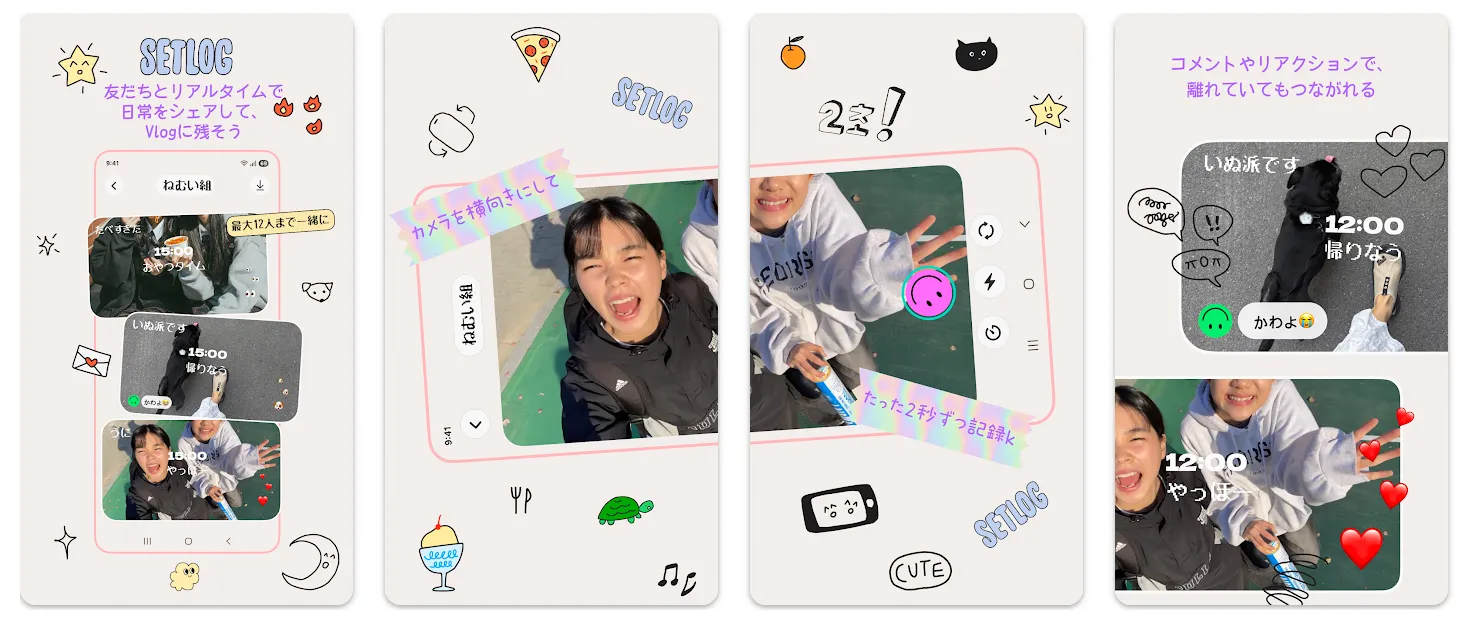

setlog is a social app that lets you record short everyday videos, share them with friends, and keep a Vlog-style record of your day. Google Play shows over one million downloads, and the app is offered for users aged 13 and older.
(Source:setlog – Apps on Google Play | Google Play)
That said, if you search for it, setlog is still often described as “a social app that records just two seconds every hour.” That was its signature feature when it first spread, but an official update on July 18, 2026 changed this to “share logs with no time limit.” At the same time, the ability to invite up to 20 people was announced.
(Source:setlog on the App Store | App Store)
This article draws on the official information available as of August 2026 to lay out what setlog is, how it currently works, its age requirements, how to think about privacy, and the points parents and children may want to check together before a child uses it.
Table of Contents
What is setlog? A social app for capturing your day in short videos

setlog is a social app where you record short everyday videos, share them with friends, and keep a Vlog-style record of the day’s moments. Rather than broadcasting polished posts to a large audience, it puts the emphasis on sharing ordinary, everyday moments with people close to you.
It is run by New Chat Inc. On the App Store the seller is listed as New Chat Inc., and on Google Play the developer is listed as newchat. The App Store listing supports Japanese.
(Source:setlog on the App Store | App Store)
What can you do with setlog?
At the heart of setlog is the experience of keeping short everyday videos on your phone and sharing them with friends.
On Instagram or TikTok, it’s common to shoot, edit, and then choose “what to post.” setlog, by contrast, is designed to make it easy to capture unremarkable moments—time spent with friends, the view during a commute—rather than saving up big events to post.
The official version history on the App Store notes that the July 2026 update introduced sharing logs with no time limit, invitations for up to 20 people, and support for both vertical and horizontal recording.
(Source:setlog on the App Store | App Store)
Note that as of August 2026, the Google Play description still uses the phrasing “keep a Vlog with friends, one little moment each hour.” Because the two official stores update their descriptions at different times, it’s important to check what the latest version of the app actually shows for detailed features.
(Source:setlog – Apps on Google Play | Google Play)
Is it still “two seconds every hour”?
It’s no longer accurate to describe today’s setlog as “a social app where you can only record for two seconds every hour.”
setlog originally spread through a system of keeping short videos at set times. Because of that, search results and social media still frequently describe it as “once an hour” or a “two-second video” app.
However, the official version history on the App Store clearly states that version 2.4.1, released on July 18, 2026, lets you “share logs with no time limit.” It also added invitations for up to 20 people and recording in both vertical and horizontal orientation.
(Source:setlog on the App Store | App Store)
Key points as of August 2026
- The “you can only record once an hour” limit was removed in an official update.
- You can invite up to 20 friends, according to the announcement.
- On the other hand, older “every hour” descriptions still remain on Google Play and elsewhere.
- Details such as recording length and notifications may change with OS and app updates.
Parents researching a child’s app should keep this in mind. Social apps can change significantly over a few weeks or months. “The way to use it that you found in a search” is not necessarily the same as the latest version installed on your child’s phone.
Why is it drawing attention, especially among teens?

The exact age breakdown of setlog’s users isn’t published, so we can’t state as fact that “teens make up the core of its users.” Still, services built around sharing short slices of daily life among friends tend to fit well with younger users’ social media culture.
Behind this is a wider shift toward social apps that share everyday life itself with people close to you—not just “posts made to show to lots of people.”
A well-known example, BeReal, is built around a once-a-day random notification that prompts you to share that moment with friends. On BeReal you can still post after the two-minute window, but the fact that you posted late is shown.
setlog can be seen as taking that idea further, extending “an ordinary, uneventful day” into the form of video and Vlog sharing.
It’s an interesting shift: as generative AI rapidly lowers the barrier to making polished photos and video, there’s a countermovement toward finding value in “a friend’s genuinely ordinary moments” rather than in highly produced content.
When looking at what’s popular with children, treating it only as “yet another weird app” won’t reveal why a service catches on. The question isn’t what children want to show, but who they want to share their everyday life with. Look there, and the meaning of a new social app becomes a little easier to understand.
What age can use setlog? Officially, it’s for users aged 13 and older
setlog officially states that its service is intended for users aged 13 and older. So for children under 13, the question isn’t even up to each family’s judgment yet—they don’t meet the official minimum age.
setlog’s official age requirement
setlog’s Child Safety Standards Policy states that “setlog is intended for users aged 13 and older,” making clear that the service targets users 13 and up.
It also says that for users found to be under 13, it will take steps to delete the account.
(Source:Child Safety Standards Policy | setlog)
The privacy policy likewise explains that the service is not directed at children under 13.
(Source:Privacy Policy | New Chat Inc.)
What the App Store and Google Play show
As of August 2026, the App Store age rating is “13+,” and Google Play also shows “13 and older.”
(Source:setlog on the App Store | App Store)
(Source:setlog – Apps on Google Play | Google Play)
A primary-school child might well hear about setlog from a friend, but if they’re under 13, the first thing to share as a family is that they don’t fall within the official age range.
Being 13 doesn’t mean it’s “safe”
Of course, turning 13 doesn’t automatically mean a child can use it without any problems.
The age requirement is the minimum line for being allowed to use the service. In actual use, other things matter too: how well a child understands personal information, whether they can talk to someone if a problem with friends comes up, and whether they can check even the background before recording.
Even at the same age of 13, every child relates to social media differently. Rather than “you’ve met the age limit, so you’re free,” a realistic approach is to check things together at first and gradually hand more over to the child once they can use it without trouble.



With setlog, what parents most want to check is “who can see it” and “what appears in it”
With setlog, the privacy question isn’t only about who your audience is. It’s also about how much of a child’s life becomes visible once short videos pile up.
Japan’s Personal Information Protection Commission (PPC), the national data protection authority, warns that when children use social media and similar services, they should be careful about writing their own or friends’ names or school names, or posting photos that reveal their address.
(Source:Privacy Awareness Week 2021 | Personal Information Protection Commission (Japan))
Uniforms, schools, and the route to school
The first thing to check in a child’s videos is information that leads back to their school.
- Uniforms and school crests
- Name tags
- Notices with the school name on them
- Club uniforms and bags
- Classrooms and school buildings
- The route to school or the nearest station
Even without saying the school name out loud, combining several pieces of information—a uniform, a station, a building—can make it easier to guess the school or the area where a child lives.
The PPC’s teaching materials for children likewise caution that names, schools, and the surrounding scenery or buildings shown in a video can reveal personal information or where someone lives.
(Source:Handle with Care: Everyone’s Important Personal Information | Personal Information Protection Commission (Japan))
Home, the nearest station, and lessons or activities
The home isn’t necessarily safe just because the address doesn’t appear on camera.
For example, the station a child always uses, a distinctive building, an apartment entrance, or the facility where they take lessons—if these appear repeatedly, they become clues for guessing where a child spends their life.
You don’t need to hide everything to get through daily life, but rather than “just watching this one video,” it’s important to think about “what could someone figure out from all the videos posted so far, taken together.”
The faces and names of family and friends
Something easy to forget on social media is other people’s privacy.
On a service for filming everyday life spent with friends, you may feel it’s fine for you to post, but a friend who appears in the video may not feel the same way.
When a friend’s face, name, conversation, or home appears, we recommend getting into the habit of checking whether it’s okay to share.
The PPC also advises that getting the person’s permission is the appropriate thing to do when posting a photo taken together with a friend on social media.
(Source:Privacy Awareness Week 2023 | Personal Information Protection Commission (Japan))
Information that reveals daily routines
When thinking about setlog, what we at the TamagoDaruma editorial desk pay particular attention to is “the privacy of time.”
A single short video, on its own, seems to contain only a tiny amount of information.
But when a record builds up day after day—uniform in the morning, school at midday, the usual station in the evening, home at night—pieces of information that meant nothing on their own start to connect.
Editor’s note
As a parent, what concerns me isn’t whether something is “safe because only two seconds are shown.” It’s more that sharing short slices of daily life over and over gradually links together a uniform, a station, a school, a time of arriving home.
I feel social media privacy has moved from an era of judging by a single post to an era of considering the accumulation of posts as well.
That doesn’t mean I think we should ban every new social app. In the long run, it’s more important for a child to become able to ask, “What can the other person figure out from this video?”
How does setlog handle privacy settings and data?

setlog’s operator says it stores user data such as photos and videos with end-to-end encryption. Even so, the service’s protection of data and what you choose to share with friends are two different things.
The data setlog says it collects
On the App Store, the developer’s declaration states that data such as name, user content, and user ID may be linked to the user.
Apple explicitly notes that this privacy information “is provided by the developer and has not been verified by Apple.”
(Source:setlog on the App Store | App Store)
Google Play’s Data Safety section shows the developer’s declaration that no data is shared with third parties, that personal information may be collected, that data is encrypted in transit, and that deletion can be requested.
(Source:setlog – Apps on Google Play | Google Play)
How are photos and videos stored?
New Chat Inc.’s privacy policy explains that user data such as messages, photos, and videos is stored end-to-end encrypted, and that the operator cannot decrypt or view the contents.
It also states that names and usernames are stored on AWS in the US North Virginia region, and photos and videos on AWS in Seoul, South Korea.
(Source:Privacy Policy | New Chat Inc.)
This is important information about the security measures the operator has made public. However, being end-to-end encrypted is not the same as the people you share with being unable to see the video.
A video shared with friends has to be treated on the assumption that those friends will see it. Once information has been shown to someone, the person who posted it may no longer be able to fully control it—including through recording on another device.
Can it be deleted?
The official privacy policy explains that messages, photos, videos, and the like are stored encrypted until the user deletes them, and that upon a deletion request or account deletion they are deleted immediately, or without undue delay to the extent technically possible.
(Source:Privacy Policy | New Chat Inc.)
However, this is an explanation about the data the service manages. It doesn’t mean footage that other users have saved by other means can be recovered.
Who can see it?
setlog is designed for inviting friends to share daily life, and the official version history on the App Store notes that you can invite up to 20 people.
(Source:setlog on the App Store | App Store)
That said, the detailed interface for things like sharing range and invitation methods may change with updates.
When a child uses it, rather than deciding “it’s fine because it’s only friends” based on words alone, it’s a good idea to check together who is actually taking part.
Can you report or block?
setlog’s Child Safety Standards Policy explains that it provides a way to report inappropriate users, messages, photos, and videos. It also directs users to report child-safety concerns from within the app or to contact a dedicated point of contact.
(Source:Child Safety Standards Policy | setlog)
Because the exact location of reporting and blocking controls can change with app updates, we recommend checking once on the latest version’s screen when you start using it.
If your child says they want to use setlog, check these 7 things together
Even when a child is 13 or older and meets the requirements, you don’t have to decide right away between “letting them use it” and “banning it.” Start by checking together who they’ll share with, where they’ll film, and what information is okay to show.
1. Who they share with
The first thing to look at isn’t the number of people but “who they are.”
School friends, friends from lessons, friends of friends, or someone known only through social media—these are all called “friends,” but the relationships are different.
One approach is to start with the range of people the child can actually explain.
2. Don’t show school or uniform
Because a uniform or school name is part of everyday life for the child, it’s hard for them to see it as personal information. Check for:
- School crest
- Name tag
- School name
- Grade and class
- Club name
Rather than making them memorize “all of this is banned,” it’s more useful—and applies to other social apps too—to build the habit of asking, “If someone who doesn’t know this saw it, could they figure out the school?”
3. Don’t show anything that reveals where you live
Beyond the address itself, there are nameplates, apartment building names, unit numbers, mail, the nearest station, and distinctive nearby buildings.
If a child often films at home, one approach is to decide in advance which places are “okay to film” and which to “avoid.”
4. Don’t film friends without asking
When a friend who is present appears on camera, check whether it’s okay to share.
This isn’t only for the sake of personal information. Thinking about “how would I feel if a video of me were shared without my knowing?” is the basis for respecting others online, too.
5. Look at the background before posting
Sometimes it isn’t the child but the background that contains important information.
Building the habit of taking a few seconds before posting to check in the order “yourself → friends → background” makes this easier.
- Is a uniform or name tag visible?
- Is there a school name?
- Is there anything that leads to an address?
- Are other people’s faces okay?
- Does it reveal too clearly where you are right now?
6. Decide who to turn to when there’s trouble
Even more important than safety settings is being able to talk to someone when something happens.
Being sent an unpleasant video, being asked by a friend to film and feeling unable to refuse, having a stranger become involved, being teased about a posted video.
If a child feels “if I tell my parents, they’ll take my phone away,” they may avoid asking for help at all.
It’s a good idea to set up rules for talking things through as well, such as “you won’t get in trouble just for coming to me with a problem.”
7. Review the settings regularly
As with setlog this time, social app features can change significantly in a short period.
In July 2026 alone, the removal of the time limit and changes to the number of people you can invite can be seen in the official version history.
(Source:setlog on the App Store | App Store)
Rather than using settings you decided once forever, we recommend reviewing them at times like a major app update, the change of a school term, or when friendships change.
The parent-and-child 7-point check before starting setlog
- Can you name everyone you’re sharing with?
- Is anything that reveals your school or uniform showing?
- Is anything that reveals your home showing?
- Are you checking before you film friends?
- Are you looking at the background before posting?
- Who will you turn to if something unpleasant happens?
- Have you decided when you’ll next review the settings?
You don’t need to build family rules from scratch each time a new social app appears. Turning the rules you set for setlog into “our family’s social media rules”—ones you can also use for Instagram, TikTok, and BeReal—will help when the next app comes along.
How is setlog different from BeReal, Instagram, and TikTok?
What sets setlog apart is sharing short everyday videos with people close to you. Rather than ranking which social app is most dangerous, it’s more practical to compare them by “with whom, what, and how they share.”
| Comparison point | setlog | BeReal | TikTok | |
|---|---|---|---|---|
| Main posts | Short everyday videos and Vlogs | A photo of the moment | Photos, videos, Stories, and more | Posts centered on short videos |
| Posting timing | No time limit now | One random notification a day, by default | Any time | Any time |
| Sharing characteristics | Sharing daily life with invited friends | Friends, and friends of friends depending on settings | Depends on followers and visibility settings | Following, recommended feed, and more |
| Age | 13 and older | Check the service’s age requirement | Teen Account for ages 13–17 | 13 and older in principle |
| What parents especially want to check | Filming background, who you share with, the accumulation of daily-life information | Visibility range, background, location information | Visibility range, DMs, followers | Visibility range, contact, recommended feed |
Instagram provides a system where new accounts for ages 13–17 start as private Teen Accounts. TikTok likewise makes new accounts for ages 13–15 private by default and offers Family Pairing for parents.
(Source:About Instagram Teen Accounts | Instagram Help Center)
(Source:Privacy settings for your child | TikTok)
Differences in post format
On TikTok and Instagram, broadcasting to a wide, unspecified audience and discovering content through recommendations are major features.
On BeReal and setlog, by contrast, the aspect of sharing daily life with people close to you is stronger.
Still, “a social app with a narrow audience is safe” isn’t necessarily true.
On public-facing social apps, “being seen by strangers” is an easy-to-understand risk; but on social apps used with people close to you, the tendency to think “it’s someone I know, so I can show anything” becomes a different point to watch.
Differences in who you share with
When thinking about social media safety, looking only at “public” versus “private” isn’t enough.
What matters is who you’re actually sharing with.
BeReal also has audience settings: “My friends only,” and, depending on the region, “My friends + their friends.”
(Source:Audience | BeReal Help Center)
It’s the same with setlog: rather than judging that “it’s for friends, so it’s safe,” it’s important to check who can actually see it.
Differences in what parents should check
Features differ from one social app to another, but the basics parents should look at don’t change much.
- Who can see it
- What appears in it
- Whether there’s a chance of connecting with strangers
- Whether you can stop it or get help when something unpleasant happens
Rather than searching only for the answer to “is this app safe?” every time a new social app appears, keeping these four points as your family’s criteria is more useful in the long run.
Frequently asked questions about setlog
Here we gather the points parents tend to wonder about: setlog’s age, the older “two seconds every hour” feature, location information, and children’s use.
- Q. What is setlog?
- It’s a social app for recording short everyday videos and keeping a Vlog-style record while sharing with friends. It used to be known for recording at set times, but an official update in July 2026 made it possible to share logs with no time limit.
- Q. Is setlog still a “two seconds every hour” app?
- There is no longer a “you can only post once an hour” limit. The App Store announced the removal of the time limit on July 18, 2026. However, the Google Play description still contains the older “every hour” wording, so check the detailed behavior in the latest version of the app.
- Q. From what age can setlog be used?
- Officially it’s intended for users aged 13 and older. For users under 13, the stated policy is not to knowingly allow use.
- Q. Can primary-school children use it?
- If they’re under 13, they don’t meet setlog’s official age range. Even for those 13 and older, we recommend not judging by age alone, but checking as a family how sharing partners and personal information are handled before use.
- Q. Is location information automatically made visible to friends on setlog?
- From the official information available as of August 2026 alone, it isn’t possible to state definitively how location information is used in the app. Check the permissions—such as location—that you’ve granted setlog on the device side. Even without sharing GPS, a place can sometimes be guessed from backgrounds in the video, such as a station name, school, or building.
- Q. Is it okay to show a uniform?
- A uniform alone won’t necessarily cause a problem, but when combined with information such as a school crest, name tag, station, or school building, it can become easier to guess the school. We recommend checking the background before posting.
- Q. Is it safe if you only share among friends?
- The type of risk differs from public sharing with an unspecified audience, but that doesn’t mean safety is guaranteed. It’s important to check who is actually taking part and what is being shared.
- Q. Is it okay to share a video with a friend in it as-is?
- When someone other than yourself—a friend or family member—appears, we recommend checking whether it’s okay to share. Even for a video you filmed yourself, the privacy of the people shown needs to be considered separately.
- Q. Can setlog videos be deleted?
- The official privacy policy explains that, in response to deletion by the user or account deletion, photos, videos, and the like are deleted immediately or without undue delay to the extent technically possible. However, this doesn’t mean footage that other users have saved by other means can be deleted.
- Q. If my child says they want to use setlog, what should I check first?
- First, check three things together: “who they’ll share with,” “not showing anything that reveals their school or home,” and “who to turn to when there’s trouble.” Rather than monitoring everything, it’s important to build rules the child can apply themselves.
When you research setlog, you may be tempted to look for a single answer to “is it a dangerous social app or a safe one?”
But looking at the official information available now, setlog itself sets an age requirement of 13 and older and points to safety measures such as end-to-end encryption and reporting policies. On the other hand, what actually appears in a video—uniform, school, home, friends—is something the app alone can’t judge.
(Source:Privacy Policy | New Chat Inc.)
(Source:Child Safety Standards Policy | setlog)
What matters isn’t memorizing whether “this social app is dangerous,” but helping children become able to ask for themselves: “Who can see this?” “What can be figured out from this video?” “What do I do if there’s trouble?”
When a new social app like setlog appears, it can feel to parents like one more unfamiliar thing has been added.
But opening the screen and saying “What’s that? Let’s take a look together” is different from a parent managing everything. It’s also a chance to build a child’s ability to make their own judgments about the many new services they’ll keep encountering.
You don’t need to memorize the right answer every time a new social app comes out. Making “who can see it,” “what it conveys,” and “what to do when there’s trouble” into your family’s shared language is the most practical preparation for keeping up with fast-changing social apps.


