


“I don’t want it to be all tablets. But thinking about the years ahead, keeping AI completely at arm’s length doesn’t feel right either.” For parents caught between those two feelings, an interesting kind of AI toy has appeared in the United States.
Its name is Stickerbox. It’s a device that takes an idea a child says out loud, turns it into an illustration with AI, and prints it on the spot as a black-and-white sticker.
Stickerbox is a creative toy that makes AI stickers from a child’s voice, without needing to keep operating a smartphone or tablet. But “screen-free” doesn’t mean “fully offline” — generating a new sticker requires an internet connection.
On top of that, the audio file itself and the transcript and generated image made from that audio are kept for different lengths of time. Rather than simply thinking “no screen, so it’s safe,” it’s worth checking how AI fits into a child’s play experience and what data it handles.
Here we look at how Stickerbox works, its price, its availability in Japan, its safety features, and how it handles voice data, all from official sources. Along the way, we also consider what parents should look for when choosing among the growing range of AI toys for children.
Table of Contents
What is Stickerbox? A new learning toy that makes AI stickers just by talking
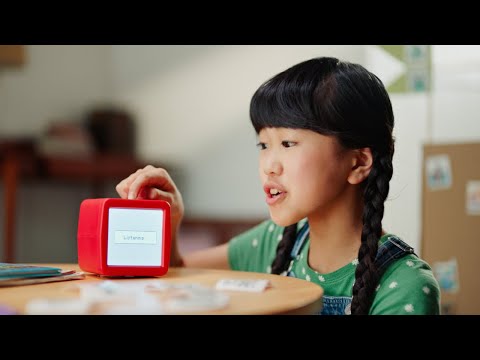
Stickerbox is an AI creative toy designed for ages 5 and up that turns an idea a child speaks into an image with AI and prints it as a black-and-white sticker. Unlike a typical image-generation AI, there’s no need to type long instructions on a keyboard.
It’s simple to use. The child holds down the white button on top of the device and says what they want to make out loud — “a dragon made of clouds,” “a cat riding a spaceship.” When they release the button, the device processes the request, the AI generates an image, and it prints as a black-and-white sticker.
The official FAQ explains that most stickers are ready within five seconds of the child finishing speaking. The device also has a small black-and-white screen that shows what was said and other information, so strictly speaking it isn’t “a toy with no screen at all.” The maker’s “screen-free” is best understood as meaning you don’t need to keep operating a smartphone or tablet.
(Source: FAQ | Stickerbox)
After printing, children can color the sticker in with the included colored pencils or art supplies they have at home, stick it in a notebook, collect characters, or make up stories.
This is what makes Stickerbox distinctive. Rather than the AI finishing a piece of work and stopping there, the flow is “think → speak → AI gives it form → color it in → stick it → keep playing from there.”
Printing uses a thermal method with no ink cartridges. As of the official product page on August 16, 2026, the device measures 3.75 inches (about 9.5 cm) square and weighs 0.67 pounds (about 304 g). It comes with 8 colored pencils, 4 rolls of dedicated paper, and a US-spec power adapter, and the 4 rolls are said to make about 265 stickers.
The dedicated paper is BPA- and BPS-free thermal paper.
(Source: Stickerbox Product Details | Stickerbox)
The idea behind Stickerbox’s “screen-free” design
Hapiko, the company that developed Stickerbox, is a startup based in Brooklyn, in the United States. The idea grew out of play between co-founder Bob Whitney and his son.
According to the official Stickerbox blog, when Bob was using generative AI with his young son to make coloring pages to play with, it led to the thought, “what if a child could print out what’s in their own head?”
In other words, the starting point was less “I want to get children using AI itself” and more building a tool that converts a child’s imagination into real-world play.
(Source: Introducing Stickerbox | Stickerbox)
New Atlas has likewise reported that Bob’s habit of making coloring pages on a home printer from his son’s ideas led to the idea for the product.
(Source: This AI gadget turns kids’ creative ideas into printable stickers | New Atlas)
In a hands-on review in November 2025, TechCrunch wrote that although the reporter and their daughter were both skeptical of the idea of an AI sticker printer at first, using it in practice suggested it could offer a form of creative play that doesn’t simply hand a child’s imagination over to AI.
(Source: Hands on with Stickerbox, the AI-powered sticker maker for kids | TechCrunch)
Why is Stickerbox “screen-free” if it uses AI?

What’s worth noting about Stickerbox is not the performance of the AI itself, but the fact that after the AI is used, the child’s activity moves off the screen.
Until now, using generative AI at home has mostly come as a set with a smartphone, tablet, or PC screen. Most of what you do — asking questions, reading text, making images — is completed on a display.
With Stickerbox, the child’s main action is “press the button and speak.” What’s generated comes out in your hand as a physical sticker. After that, play shifts to analog activities: coloring, sticking, adding more characters.
The official product page also highlights features like “Physical Creation,” “No adult devices required,” “No open-ended conversation,” and “No open internet access.”
(Source: Stickerbox Product Details | Stickerbox)
What this points to is that, as AI moves into physical toys, “AI time” and “screen time” may no longer mean the same thing from here on.
At the same time, it isn’t right to decide, from the word “screen-free” alone, that this is “a toy away from anything digital.”
The reality of “screen-free,” and the trade-offs
Editor’s note
What I find most interesting about Stickerbox is that the old question itself — “should we let children use AI or not?” — is starting to feel a little dated.
Stickerbox has a small screen, and generating a new sticker requires a connection to Wi-Fi or a hotspot. On top of that, digital processing such as voice recognition and AI image generation is taking place.
Yet what the child themselves experiences is less “operating an AI service” and more the play of “I say what I thought of, and it comes out as a sticker.”
As AI is built into toys, stationery, home appliances, stuffed animals, and the like, there will be more and more situations where children aren’t aware that “I’m using AI right now.”
That’s exactly why parents will need a way of looking at things that is not “AI or not,” but “where is AI used, what data does it take in, and what does it produce?”
According to the official FAQ, generating a new sticker requires a Wi-Fi or hotspot connection, and it needs to be used within Wi-Fi range even after connecting. It also has no built-in battery and uses the included power adapter.
(Source: FAQ | Stickerbox)
So to be precise, it is “an AI toy that isn’t screen-centered,” but it is not an “offline toy.”
For thinking about digital play and screen time, our article using Minecraft as an example to sort through home rules and safety settings may also help.


Is it safe? Checking how voice data and privacy work
Stickerbox has several safety features as an AI product for children: a design that doesn’t listen for audio at all times, content filters, and a companion app for parents.
The most important thing, though, is not to treat “the audio file being deleted” and “all data related to the input being deleted” as the same thing.
First, on audio capture, the official FAQ explains that Stickerbox is not constantly listening to surrounding sound, and captures audio only while the child holds the button on top of the device. When they let go of the button, audio capture stops, and there is no wake word or constant background audio processing.
It also says that before AI generation, several content safety layers are in place to block inappropriate or age-inappropriate prompts. Parents can check what has been generated from the companion app.
(Source: FAQ | Stickerbox)
When it comes to privacy, it’s important to read beyond the product page and check the Privacy Policy itself.
| Data | Retention period per the official Privacy Policy |
|---|---|
| Audio file | Deleted immediately after the transcript and image are created |
| Transcript | Kept until you request deletion or delete your account |
| Generated image | Kept until you request deletion or delete your account |
Stickerbox’s Privacy Policy states clearly that while the audio file is deleted after the transcript and image are created, the transcribed content and generated image are kept until you request deletion or delete your account.
Parents can also check the transcript and images from the app and delete them individually.
(Source: Privacy Policy | Stickerbox)
So while the explanation that “the recorded voice itself isn’t stored long-term” is accurate, it doesn’t mean “nothing related to what the child said remains.”
This is a point worth remembering when looking at voice-AI products for children. Checking not only “does it record?” but also what derivative data is created and how long it is retained makes the real picture easier to understand.
Also, regarding the personal information of children under 13, Stickerbox says it does not use it for targeted or behavioral advertising. On the other hand, to the extent necessary for providing and maintaining the service, it may disclose information to service providers such as hosting and technology providers.
(Source: Privacy Policy | Stickerbox)
Stickerbox states on its official site that it is COPPA-compliant and kidSAFE Certified.
COPPA is a US rule that sets certain requirements for websites, online services, and the like aimed at children under 13 when they collect children’s personal information online. COPPA compliance does not mean “the US government has certified the safety of the toy as a whole.”
(Source: Children’s Online Privacy Protection Rule (COPPA) | Federal Trade Commission)
Having safety features doesn’t mean there’s nothing to pay attention to, and being a voice AI doesn’t mean you need to be overly afraid. What matters is breaking the question down into a few concrete points: “when does the microphone work,” “what does it store,” and “can parents review and delete it.”
Stickerbox specs, price, and what’s included

Per official information as of August 16, 2026, the Stickerbox unit is US$129.99. It comes with 8 colored pencils, 4 rolls of BPA- and BPS-free dedicated paper, and a US-spec power adapter.
| Item | Stickerbox |
|---|---|
| Recommended age | 5 and up |
| Unit price | US$129.99 (as of August 16, 2026) |
| Size | 3.75 × 3.75 × 3.75 inches (about 9.5 cm square) |
| Weight | 0.67 pounds (about 304 g) |
| Input method | Voice input while holding the button |
| Printing | Black-and-white thermal printing |
| Wi-Fi | Required when generating a new sticker |
| Battery | Not built in |
| Included | 8 colored pencils, 4 rolls of dedicated paper, US-spec power adapter |
| Approximate number of stickers | About 265 with the 4 included rolls |
| Parent app | Yes |
Standard dedicated paper is listed at US$5.99 for 3 rolls, and hologram paper at US$14.99 for 3 rolls. Prices may change, so check the official site for the latest information when buying.
(Source: Stickerbox Product Details | Stickerbox)
The official FAQ also notes that thermal paper other than Stickerbox’s dedicated paper is not supported, and that using other paper may damage the printer and void the warranty.
(Source: FAQ | Stickerbox)
Comparison table: Stickerbox vs. AI stuffed animals, smart speakers, and AI learning apps
Even lumped together as “AI toys,” the role the AI plays differs greatly from product to product. Stickerbox is designed to turn a child’s idea into a physical object, rather than hold an open-ended conversation.
| Comparison point | Stickerbox | AI stuffed animals | Smart speakers | AI learning apps |
|---|---|---|---|---|
| Main purpose | Generating a creation | Depends on the product | Getting information, controls, etc. | Learning support |
| Main input | Voice | Mainly voice | Mainly voice | Screen, voice, etc. |
| Physical creation | Remains as a sticker | Depends on the product | Generally none | Generally none |
| Free conversation with AI | Basically none | Some products support it | Depends on the feature | Depends on the product |
| Always-on listening | None | Depends on the product | Depends on the product | Depends on the product |
| Screen use | Minimal | Depends on the product | Depends on the product | Usually screen-based |
| What parents especially want to check | Voice, generation history, stored data | Conversation content, data, ongoing use | Voice history, account settings | Data, billing, usage time |
*Categories other than Stickerbox summarize general characteristics; actual specs and safety features differ by product.
Stickerbox’s official materials also highlight “No always-on listening,” “Closed Loop,” and “No Browsing” as features of its product.
(Source: Stickerbox Product Details | Stickerbox)
What matters here is what role the AI actually plays in the product, more than whether it has AI built in.
An AI that converses freely with a child for long stretches, and an AI that receives audio only when a button is pressed and returns a single image, differ both in the experience and in the points parents should check.
Can you buy it from Japan? What we know at this point
As of August 16, 2026, the official Stickerbox product page states that it “currently ships within the United States.” The included power adapter is also US-spec.
For that reason, at this point we can’t recommend it as a product officially sold for the Japanese market. For official sales and support for Japan, you’ll need to check future announcements from the maker.
(Source: Stickerbox Delivery Information | Stickerbox)
On language, the official FAQ clearly states that it “understands multiple languages.” However, we couldn’t find a list that explicitly names Japanese as a specifically supported language.
So at this point we can’t state for certain that it works in Japanese with the same recognition accuracy as English. If it officially launches in Japan, the supported languages, warranty, and power specifications will need to be checked again.
(Source: FAQ | Stickerbox)
Rather than seeing it as a recommended toy you can buy in Japan right now, at this stage it’s more meaningful to see it as an example of a new kind of product design that uses AI while moving a child’s play back into the physical world.
5 things to check when choosing an AI learning toy
Whether it’s Stickerbox or anything else, when choosing AI toys or AI services for children from here on, don’t decide on impressions alone — “AI, so it sounds convenient,” “screen-free, so it’s safe.” Try checking these five things.
- 1. What does the AI take in as input?
Is it voice only, or does it also use a camera or location data? Check whether the microphone is always on standby, or works only when operated. - 2. What is the input data turned into, and what remains?
Check not just the audio itself but derivative data such as transcripts, images, and conversation history, along with retention periods. - 3. Does the AI interaction end after one task, or continue over time?
Whether it ends with one generation, keeps up a free conversation, or can access the open internet makes for a very different kind of interaction. - 4. Can parents review, manage, and delete?
Check how to see usage history and generated content, data deletion, account management, and whether there are content filters. - 5. After the AI is used, what does the child do next?
Whether it ends with just looking at the generated result, or leads to the next play — drawing, making, thinking, talking — is also an important factor.
The fifth point matters for a different reason: it is about the quality of the child’s play, not just safety.
Higher AI performance isn’t necessarily better for a child. Rather than the AI completing everything, there are cases where it suits home play better to have room for the child’s actions to continue — “I want it more like this,” “next I want to make this” — using the AI’s output as a starting point.
Frequently asked questions (FAQ)
Here we gather the points parents may want to check before buying Stickerbox.
- Q. From what age can Stickerbox be used?
- Officially it’s designed for ages 5 and up. The recommended age is one benchmark for thinking about safety and ease of use, so for use outside that age, check the maker’s guidance.
- Q. Is Stickerbox completely screen-free?
- You don’t need to keep operating a smartphone or tablet, but the device has a small black-and-white screen. So rather than “no screen at all,” it’s better thought of as a design that keeps screen dependence down.
- Q. Is voice data stored?
- The official Privacy Policy says the audio file is deleted immediately after the transcript and image are created. The transcript and generated image, meanwhile, are kept until you request deletion or delete your account.
- Q. Is Stickerbox always listening to surrounding sound?
- The official FAQ explains that it captures audio only while the button on top is held, and does not continuously listen or record in the background.
- Q. Could inappropriate images be generated?
- Stickerbox says it passes prompts through several content safety layers before generation to block inappropriate or age-inappropriate content. That said, it doesn’t claim the AI’s output makes anything unexpected “absolutely impossible,” so it’s worth using the feature that lets parents check the generation history.
- Q. Can you buy it from Japan?
- As of August 16, 2026, the official site states it ships only within the United States. We haven’t been able to confirm official sales for Japan.
- Q. Can it be used in Japanese?
- The official FAQ says it understands multiple languages. However, since we can’t find a statement explicitly naming Japanese as a specifically supported language, we can’t state its specific recognition accuracy in Japanese.
- Q. Does it run on batteries?
- No. It has no built-in battery, and the official FAQ says it uses the included power adapter.
- Q. Can it be used without Wi-Fi?
- Generating a new sticker requires a Wi-Fi or hotspot connection. It also needs to be used within Wi-Fi range even after connecting.
- Q. Can I use thermal paper other than the dedicated paper?
- The official FAQ says that only Stickerbox’s dedicated paper is supported. It notes that using other paper may damage the printer and void the warranty.
- Q. What are the running costs?
- As of August 16, 2026, standard dedicated paper is US$5.99 for 3 rolls, and hologram paper is US$14.99 for 3 rolls. Prices may change, so check the official site when buying.
(Source: FAQ | Stickerbox)
(Source: Privacy Policy | Stickerbox)
(Source: Stickerbox Product Details | Stickerbox)
TamagoDaruma’s take
What Stickerbox shows isn’t the simple equation of “AI = something that ties children to a screen.”
Even when AI is used, depending on the design, it can send play back to physical activities from there — coloring, sticking, thinking up stories, talking together as parent and child.
At the same time, it isn’t right to look only at the word “screen-free” and decide it’s “not digital” or “handles no data.” Stickerbox is also an AI product that connects to the internet, processes voice, and handles transcripts and generated images.
What matters is not whether a product “has AI,” but what role that AI actually plays in the child’s experience.
And there’s one more thing we want to value with children’s AI: what happens “after” the AI has done its work.
Does the AI give an answer and stop there? Does the AI finish a piece of work and stop there? Or does the child themselves, using that output as a starting point, think “what next,” move their hands, and talk with someone?
In the sense of “an AI experience that doesn’t make AI the star,” Stickerbox is an interesting case for thinking about children’s technology going forward.
From here on, AI will enter children’s lives in more natural forms — not just inside screens, but in toys, stationery, and home appliances. That’s exactly why, rather than only the binary of “let them use it or not,” knowing how it works and choosing the distance that suits your family will matter for parents from here on.


